ProtoMap is a context engine and model harness. It scans your source code and gives engineers and coding agents
organization-wide context on every gRPC service and Protobuf message: callers, dependencies, call sites, and
field-level dataflows.
Claude Code with Opus 5.5 at high effort, across 20 prompts on 9 gRPC repositories (5M LOC), with
higher accuracy (100% vs. 98%). See the benchmarks
Products
ProtoMap and the Privacy Code Scanner
For engineering teams and coding agents
ProtoMap
A context engine and model harness for gRPC and Protobuf. Engineers query it in plain English; coding agents
query it over MCP instead of grepping across repositories.
Callers, dependencies, call sites, and field-level dataflows
13× fewer tokens and 7.7× faster answers in the benchmarks
Free on one machine; cloud or on-premises for your organization
Engineering: gRPC and Protobuf context for your coding agents
The gap
API specs alone don't cover the services and fields consuming your APIs.
→
The cost
Without it, agents spend tokens grepping repositories and writing ad hoc scripts to parse code relationships, often on code that isn't checked out locally, and still miss callers.
Privacy: code-based GDPR data maps and RoPA evidence
The gap
Processing activities fall out of sync with the code: surveys don't scale and produce stale or guessed answers, GRC platforms ship blank templates, and privacy platforms infer flows after deployment, missing shadow AI and SDKs in code.
→
The cost
Stale evidence: documentation weeks or months behind the code, and reported processing activities that diverge from implementation with every release.
→
With HoundDog.ai
GDPR data mapping grounded in code-based evidence across logs, storage, APIs, third-party and AI SDKs, keeping your RoPA current at development speed so you prevent risks instead of reacting after the fact.
Data Security: stop PII, PHI, and secrets before they leak
The gap
DSPM gives you posture and DLP removes or redacts sensitive data, but both react once the data is already there. Neither prevents it.
→
The cost
When PII, PHI or auth tokens leak into logs, remediation is disruptive: often hundreds of hours scrubbing logs, auditing access and halting ingestion by third-party monitoring and SIEM tools.
reduction in tokens and time for change-planning tasks (enterprise customer, monorepo of millions of lines of code).
Cost$4.46 → $0.20
for a single prompt, 8m 13s down to 27s
(Claude Code, Opus 5.5). See the benchmarks
SpeedEvery commit
context refreshes in CI on standard CPU infrastructure.
Privacy Code Scanner
GDPR data mapping, RoPA & leak prevention
Headline result90%
less manual data-mapping effort (Fortune 500 outcome).
Cost$2M
saved by one customer in eng hours and masking tooling.
Speed< 5 min
to remediate a flagged exposure, fix suggested in the PR.
ProtoMap's figures are from its benchmarks, for one prompt (Q09, finding every caller of a method to remove
it): Claude Code with Opus 5.5 at high effort, on 9 gRPC repositories with 5 million lines of code, with and without ProtoMap. Results vary by model, repository, prompt and task.
Flagship deployment
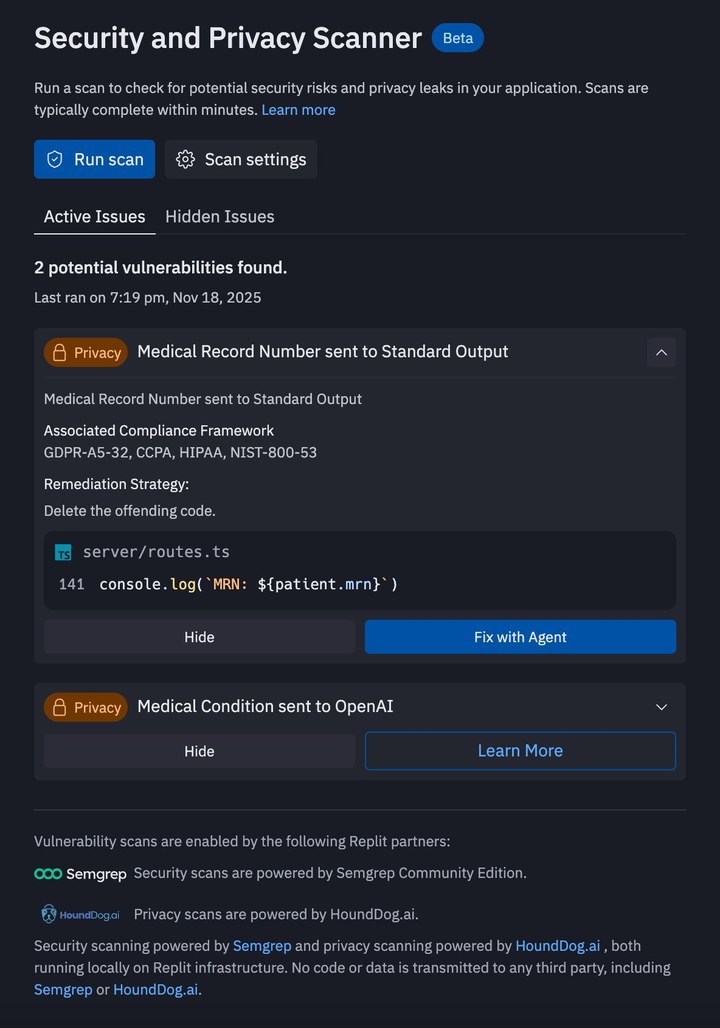
HoundDog.ai + Replit
50M
Users protected
100k
Scans daily
100+
Data types
Detects leaks before publishing. Auth tokens and passwords in logs or local storage, caught at scan time.
Flags unscoped AI & third-party flows. PII/PHI to integrations that don't match published privacy notices.
Privacy by default, not retrofit. AI-generated apps embed GDPR & CCPA best practices from day one.
Try it on your code.
Install the self-hosted version for free. It runs on your machine with Docker, and your source code stays in your environment.
Set up ProtoMap and show me what it can do. ProtoMap maps gRPC services and protobuf messages across repositories, and gives coding agents that graph over MCP. Docs: https://docs.protomap.ai/quickstart/

Tell me what you are about to do before each step that installs something.

1. Check that this computer has git, Docker with Compose 2.23.1 or newer, at least 4 GB of RAM, and 20 GB of disk space. If anything is missing, tell me and stop.

2. Install ProtoMap Server, in a folder outside this repository:

   git clone https://github.com/hounddogai/protomap.git
   cd protomap
   ./self-hosted/scripts/install.sh

   The installer asks questions. Choose Trial, which runs PostgreSQL locally and logs the CLI in, and keep the default port.

3. Show me the address and the one-time setup key the installer prints. Ask me to open the address, enter the key, and create my organization and owner account. Wait until I say that's done.

4. Scan this repository, from a new shell so the CLI is on the PATH:

   protomap scan .

   If it has no gRPC services in a supported language, tell me, and offer to scan a public example instead:

   git clone https://github.com/GoogleCloudPlatform/microservices-demo.git
   protomap scan microservices-demo

5. From the scanned repository's folder, add ProtoMap to yourself as an MCP server:

   Claude Code: claude mcp add protomap -- protomap mcp serve
   Codex: codex mcp add protomap -- protomap mcp serve
   Antigravity: add "protomap": { "command": "protomap", "args": ["mcp", "serve"] } under mcpServers in ~/.gemini/config/mcp_config.json
   Others: https://docs.protomap.ai/coding-agents/

   Tell me if I need to restart you for it to take effect.

6. Tell me what the scan found, then use ProtoMap's tools to answer one question about my services, such as which services call a method and where. Suggest two more questions I could ask.